- Joined
- Mar 6, 2026
- Messages
- 8
- Motherboard
- HP Z2 Mini G3
- CPU
- i7-7770k
- Graphics
- Intel UHD630
- OS X/macOS
- 12.x
- Bootloader
- OpenCore (UEFI)
- Mac
- Mac mini
- Mobile Phone
- Android
Please help on what Device Properties make sense for a very unique system configuration. I am aware that the NVIDIA GPU is not supported by MacOS Sonoma.
Tried the following Device Properties, but get a black screen. The only way around this for completing the installation was to add -igfxvesa in the boot argument.
Device Properties:
PciRoot(0x0)/Pci(0x2,0x0)
├── AAPL,ig-platform-id → 07009B59 (Data) // Desktop with connectors
├── device-id → 16590000 (Data)
├── framebuffer-patch-enable → 01000000 (Data)
├── framebuffer-stolenmem → 00004001 (Data) // 256MB (to match BIOS settings)
├── framebuffer-con1-enable → 01000000 (Data)
├── framebuffer-con1-type → 00040000 (Data) // DisplayPort
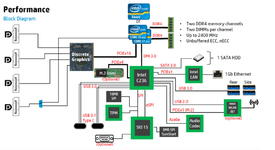
The system configuration is basically capable of operating in two distinct modes (see system diagram below):

Tried the following Device Properties, but get a black screen. The only way around this for completing the installation was to add -igfxvesa in the boot argument.
Device Properties:
PciRoot(0x0)/Pci(0x2,0x0)
├── AAPL,ig-platform-id → 07009B59 (Data) // Desktop with connectors
├── device-id → 16590000 (Data)
├── framebuffer-patch-enable → 01000000 (Data)
├── framebuffer-stolenmem → 00004001 (Data) // 256MB (to match BIOS settings)
├── framebuffer-con1-enable → 01000000 (Data)
├── framebuffer-con1-type → 00040000 (Data) // DisplayPort
The system configuration is basically capable of operating in two distinct modes (see system diagram below):
- NVIDIA GPU–only mode (Default Configuration)
- NVIDIA GPU + Intel GPU mode.