• Become a Premium Member for $25/year with no ads to improve your community experience. Upgrade to Pro Account for faster response and no wait times!

  • We regret to inform you that our server had an unexpected catastrophic failure and we lost the recent backups as well. The last healthy backups was restored of February 24, 2025. Members who have already registered, please consider a reregistration. Once re-registered, the memberships will be restored for those who have purchased a membership. We'll continue to monitor and send emails to assist you to have you onboard. Any inconvenience is highly regretted. Thank you for your continued support and participations.

    Sincerely, EliteMacx86

Stuck on ApplePS2Controller Catalina ( ASUS ExpertBook P3540FA )

2MB. xD

Disable RebuildAppleMemory and enable EnableWriteUnprotector and then check.
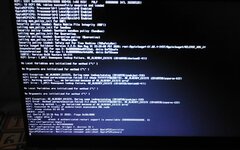
It's again stuck on:
ApplePS2Controller: Notification consumer published: ApplePS2Controller
ApplePS2Controller: Notification consumer published: ApplePS2Keyboard
 

Attachments

It's again stuck on:
ApplePS2Controller: Notification consumer published: ApplePS2Controller
ApplePS2Controller: Notification consumer published: ApplePS2Keyboard
Revert the Quirk.

Enable RebuildAppleMemoryMap and disable EnableWriteUnprotector. Also, disable SetupVirtualMap and then check.
 
Revert the Quirk.

Enable RebuildAppleMemoryMap and disable EnableWriteUnprotector. Also, disable SetupVirtualMap and then check.
Idk how to revert quirk so i try using default quirk settings of OC 1.0.0 and do the changes and the result is KP !
 

Attachments

Idk how to revert quirk so i try using default quirk settings of OC 1.0.0 and do the changes and the result is KP !
Enable SyncRuntimePermissions and then check.
 
The KP's still there. Is the problem comes from the BIOS settings or smth.
Well, in that case, attach your BIOS Settings. Take pictures, zip them in a single file or upload the photos directly.

Also, are you using some sort of bad USB or image? There have been cases like that.
 
Also, are you using some sort of bad USB or image? There have been cases like that.
I'm just switched to a new USB so maybe the issue comes from the new USB? And from the image i'm using macrecovery.py from OC packages.
 
I'm just switched to a new USB so maybe the issue comes from the new USB?
Is common. Happened for a fellow member a few days back!

And from the image i'm using macrecovery.py from OC packages.
Re-download to ensure you're using a valid complete image. Delete the previous one, re-download.
 

Attachments

Trending content

Forum statistics

Threads
1,926
Messages
17,854
Members
27,670
Latest member
Abdel11