• Become a Premium Member for $25/year with no ads to improve your community experience. Upgrade to Pro Account for faster response and no wait times!

MacOS Sonoma: Setting up NVIDIA GPU + Intel HD630 GPU mode Help Please

rhinca2026

New member
Joined
Mar 6, 2026
Messages
9
Motherboard
HP Z2 Mini G3
CPU
i7-7770k
Graphics
Intel UHD630
OS X/macOS
12.x
Bootloader
  1. OpenCore (UEFI)
Mac
  1. Mac mini
Mobile Phone
  1. Android
Please help on what Device Properties make sense for a very unique system configuration. I am aware that the NVIDIA GPU is not supported by MacOS Sonoma.

Tried the following Device Properties, but get a black screen. The only way around this for completing the installation was to add -igfxvesa in the boot argument.

Device Properties:


PciRoot(0x0)/Pci(0x2,0x0)
├── AAPL,ig-platform-id → 07009B59 (Data) // Desktop with connectors
├── device-id → 16590000 (Data)
├── framebuffer-patch-enable → 01000000 (Data)
├── framebuffer-stolenmem → 00004001 (Data) // 256MB (to match BIOS settings)
├── framebuffer-con1-enable → 01000000 (Data)
├── framebuffer-con1-type → 00040000 (Data) // DisplayPort

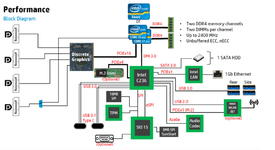
The system configuration is basically capable of operating in two distinct modes (see system diagram below):
  1. NVIDIA GPU–only mode (Default Configuration)
  2. NVIDIA GPU + Intel GPU mode.
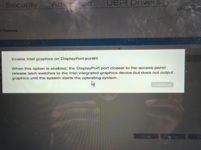
In the BIOS I can select and enable Intel graphics on DisplayPort port #4 (mux shown in the system block diagram below) in the BIOS and also configure the Video Memory. Its quite possible the the Intel GPU doesn't get started until after the OS get loaded....

1773859705199.png

1773967399314.png
 
Last edited:
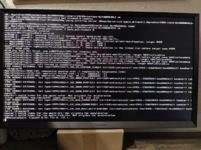
Tried going through all the connectors but still have a black screen on DP#4 which is driven by the iGPU. The NVIDIA Quadro Display Port show the boot log up until the point where the iGPU is supposed to take over.


Key

Value

Status

Purpose

AAPL,ig-platform-id

00001259

✅ Correct

Headless framebuffer with hidden connectors

device-id

16590000

✅ Correct

Spoofs to native ID 0x5916

framebuffer-fbmem

00009000

✅ Correct

9MB framebuffer memory

framebuffer-patch-enable

01000000

✅ Correct

Enables patching

framebuffer-stolenmem

00004001

✅ Correct

256MB (matches your BIOS)

disable-external-gpu

01000000

✅ Correct

Device-level NVIDIA disable

framebuffer-con0-enable

01000000

✅ Correct

Enables connector 0 for testing

framebuffer-con0-type

00040000

✅ Correct

Sets connector 0 as DisplayPort

1773971453507.png
 
Please help on what Device Properties make sense for a very unique system configuration. I am aware that the NVIDIA GPU is not supported by MacOS Sonoma.

Tried the following Device Properties, but get a black screen. The only way around this for completing the installation was to add -igfxvesa in the boot argument.

Device Properties:


PciRoot(0x0)/Pci(0x2,0x0)
├── AAPL,ig-platform-id → 07009B59 (Data) // Desktop with connectors
├── device-id → 16590000 (Data)
├── framebuffer-patch-enable → 01000000 (Data)
├── framebuffer-stolenmem → 00004001 (Data) // 256MB (to match BIOS settings)
├── framebuffer-con1-enable → 01000000 (Data)
├── framebuffer-con1-type → 00040000 (Data) // DisplayPort

The system configuration is basically capable of operating in two distinct modes (see system diagram below):
  1. NVIDIA GPU–only mode (Default Configuration)
  2. NVIDIA GPU + Intel GPU mode.
In the BIOS I can select and enable Intel graphics on DisplayPort port #4 (mux shown in the system block diagram below) in the BIOS and also configure the Video Memory. Its quite possible the the Intel GPU doesn't get started until after the OS get loaded....

View attachment 10050

View attachment 10053
This is interesting. Can you add the BIOS settings to review?
 
Tried going through all the connectors but still have a black screen on DP#4 which is driven by the iGPU. The NVIDIA Quadro Display Port show the boot log up until the point where the iGPU is supposed to take over.


Key

Value

Status

Purpose

AAPL,ig-platform-id

00001259

✅ Correct

Headless framebuffer with hidden connectors

device-id

16590000

✅ Correct

Spoofs to native ID 0x5916

framebuffer-fbmem

00009000

✅ Correct

9MB framebuffer memory

framebuffer-patch-enable

01000000

✅ Correct

Enables patching

framebuffer-stolenmem

00004001

✅ Correct

256MB (matches your BIOS)

disable-external-gpu

01000000

✅ Correct

Device-level NVIDIA disable

framebuffer-con0-enable

01000000

✅ Correct

Enables connector 0 for testing

framebuffer-con0-type

00040000

✅ Correct

Sets connector 0 as DisplayPort

View attachment 10054
Firstly, when you use a display with the port, its not a headless configuration. Headless mode is used when you also have a dGPU as a main GPU and the IGPU for QSV and other functions.

Secondly, you must match the physical port on the device with the framebuffer-conX. It might be possible that the physical port #4 matches to framebuffer-con03. In such case, you can simply enable all the connectors. You can even setup remote and then check if you can access the system.

Third, you should set the DVMT to 64MB and remove the stolenmem entry.

Fourth, you should make sure that the -igfxvesa flag is removed.
 

Forum statistics

Threads
2,209
Messages
20,276
Members
30,864
Latest member
lupenyk