• Become a Premium Member for $25/year with no ads to improve your community experience. Upgrade to Pro Account for faster response and no wait times!

  • We regret to inform you that our server had an unexpected catastrophic failure and we lost the recent backups as well. The last healthy backups was restored of February 24, 2025. Members who have already registered, please consider a reregistration. Once re-registered, the memberships will be restored for those who have purchased a membership. We'll continue to monitor and send emails to assist you to have you onboard. Any inconvenience is highly regretted. Thank you for your continued support and participations.

    Sincerely, EliteMacx86

macOS boot entry disappeared after trying to re-partition through Disk Utility

sudo diskutil apfs resizeContainer disk1 0
Started APFS operation Error: -69743: The new size must be different than the existing size
 
Started APFS operation Error: -69743: The new size must be different than the existing size
Looks like you have reached the allocation space for APFS.
 
Looks like you have reached the allocation space for APFS.
I don't know what that means. On another note, could my USB drive being also inserted mess up macOS? Should I re-try rebooting and ejecting it?
 
I don't know what that means. On another note, could my USB drive being also inserted mess up macOS? Should I re-try rebooting and ejecting it?
No, that has no effect on this.

Using Live Ubuntu, try to run gparted and it should give you the option to expand.
 
Using Live Ubuntu, try to run gparted and it should give you the option to expand.
Can I use the normal Gparted iso? Ubuntu is pretty heavy (almost 4gb) and my internet is rather slow.
 
The following steps may lead the system to an unbootable state.

Backup your data
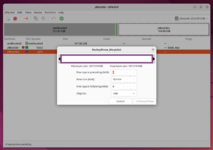
Right click on macOS partition, select “Move/Resize”
Move macOS partition to far to the left and extend it far to the right (by using the right arrow marker)
Read and accept error message.
Let GParted do the rest and reboot.
 
The following steps may lead the system to an unbootable state.

Backup your data
Right click on macOS partition, select “Move/Resize”
Move macOS partition to far to the left and extend it far to the right (by using the right arrow marker)
Read and accept error message.
Let GParted do the rest and reboot.
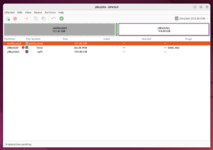
But you can't resize the macOS partition, it's "blocked" as you can see in the screenshot.
 
But you can't resize the macOS partition, it's "blocked" as you can see in the screenshot.
Then unfortunately, you'll have to do a clean install.
 
Then unfortunately, you'll have to do a clean install.
Can I clean install in the old Linux partition (disk 2) with the latest OpenCore version and transfer all my apps/files/settings from the old installation?
 

Trending content

Forum statistics

Threads
1,926
Messages
17,856
Members
27,670
Latest member
Abdel11