- Joined
- Feb 15, 2026
- Messages
- 12
- Motherboard
- Gigabyte GA-Z77M-D3H
- CPU
- Intel 3770S
- Graphics
- Radeon R7 250X
- OS X/macOS
- 10.14.x
- Bootloader
- Clover (Legacy)
- Mac
- MacBook Pro
- Mobile Phone
- Android
Hello,
I'm an old-school OSx86 user and I'm still using Mavericks. Why? Because it works. The Clover setup I'm using is probably 10 years old, but it works fine on many different boards. I'm also using Legacy BIOS, never had a reason to switch to UEFI. I'm only doing desktop publishing, graphics work and audio editing, so I don't need anything newer. If somebody is requiring help with older hardware or software, ask me. I also have old software versions patched for use with modern macOS versions. I also have version 148 of Firefox Dynasty. The GitHub page disappeared from one day to another.
Future plans: I've actually done a new Mavericks installation and now I'm on creating a fresh installation of Mojave. I have hardware which has 32 bit drivers only, so I always want to have an older OS X version available. There's also some great software which never got a 64 bit port. On this hardware I'll try Monterey too. To avoid conflicts I have all kexts in S/L/E. No kexts in Clover. Mojave is installed on an HFS+ partition.
Hardware: Gigabyte GA-Z77M-D3H, Core I7 3770S, 32 GB RAM, Sapphire GPRO 4200 graphics card (4x Mini-DP, 4 GB VRAM, ID 0x682B), Broadcom WLAN/Bluetooth, Asus U3S6 (Combo card with Marvell SATA and NEC USB3) and a Creative Audigy 2 ZS PCI soundcard. All components are fully working.
Recently I got an Asus PA32QCV 6k monitor. It's great, but this monitor wasn't made for user who sometimes need to go into BIOS or open the boot menu. It takes endlessly until it shows an image. So I wanted to use the Intel HD4000 for an additional iiyama monitor which is starting faster. It has VGA, DisplayPort and HDMI.
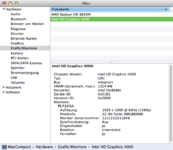
On Mojave I got a working GPRO 4200, the HD4000 is just showing the text from the boot sequence, no macOS display. But it is the main display, the GPRO 4200 screen has no menu bar or Dock. OS X crashes at boot if IntelFramebufferCapri.kext is installed. If I remove it, I have working dual monitor, but the HD4000 has no QE/CI, visible on the grey menu bar.
The HD4000 is connected to IGFX, the GPRO 4200 at PEG0, PEGP, GFX0, depending on the Clover settings. So I guess the problem is either in AppleIntelFramebufferCapri or the display name settings. Lilu and WhateverGreen is installed and loaded. But I have to admit that I don't see a difference if the kexts are loaded. The system also works without them. I'm also still using FakeSMC, VirtualSMC never worked for me.
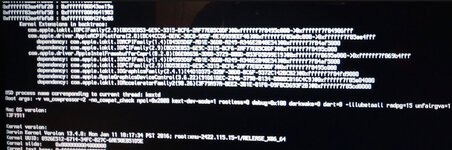
Here's the Clover plist. I also added a photo with the Mavericks crash at boot.
Greets, naquaada.
I'm an old-school OSx86 user and I'm still using Mavericks. Why? Because it works. The Clover setup I'm using is probably 10 years old, but it works fine on many different boards. I'm also using Legacy BIOS, never had a reason to switch to UEFI. I'm only doing desktop publishing, graphics work and audio editing, so I don't need anything newer. If somebody is requiring help with older hardware or software, ask me. I also have old software versions patched for use with modern macOS versions. I also have version 148 of Firefox Dynasty. The GitHub page disappeared from one day to another.
Future plans: I've actually done a new Mavericks installation and now I'm on creating a fresh installation of Mojave. I have hardware which has 32 bit drivers only, so I always want to have an older OS X version available. There's also some great software which never got a 64 bit port. On this hardware I'll try Monterey too. To avoid conflicts I have all kexts in S/L/E. No kexts in Clover. Mojave is installed on an HFS+ partition.
Hardware: Gigabyte GA-Z77M-D3H, Core I7 3770S, 32 GB RAM, Sapphire GPRO 4200 graphics card (4x Mini-DP, 4 GB VRAM, ID 0x682B), Broadcom WLAN/Bluetooth, Asus U3S6 (Combo card with Marvell SATA and NEC USB3) and a Creative Audigy 2 ZS PCI soundcard. All components are fully working.
Recently I got an Asus PA32QCV 6k monitor. It's great, but this monitor wasn't made for user who sometimes need to go into BIOS or open the boot menu. It takes endlessly until it shows an image. So I wanted to use the Intel HD4000 for an additional iiyama monitor which is starting faster. It has VGA, DisplayPort and HDMI.
On Mojave I got a working GPRO 4200, the HD4000 is just showing the text from the boot sequence, no macOS display. But it is the main display, the GPRO 4200 screen has no menu bar or Dock. OS X crashes at boot if IntelFramebufferCapri.kext is installed. If I remove it, I have working dual monitor, but the HD4000 has no QE/CI, visible on the grey menu bar.
The HD4000 is connected to IGFX, the GPRO 4200 at PEG0, PEGP, GFX0, depending on the Clover settings. So I guess the problem is either in AppleIntelFramebufferCapri or the display name settings. Lilu and WhateverGreen is installed and loaded. But I have to admit that I don't see a difference if the kexts are loaded. The system also works without them. I'm also still using FakeSMC, VirtualSMC never worked for me.
Here's the Clover plist. I also added a photo with the Mavericks crash at boot.
Greets, naquaada.
Attachments
Last edited: