• Become a Premium Member for $25/year with no ads to improve your community experience. Upgrade to Pro Account for faster response and no wait times!

  • We regret to inform you that our server had an unexpected catastrophic failure and we lost the recent backups as well. The last healthy backups was restored of February 24, 2025. Members who have already registered, please consider a reregistration. Once re-registered, the memberships will be restored for those who have purchased a membership. We'll continue to monitor and send emails to assist you to have you onboard. Any inconvenience is highly regretted. Thank you for your continued support and participations.

    Sincerely, EliteMacx86
Ok now im really lost lol :-( .Thats what ive trying to do with no success thats why i wroted here. I've uploaded the SSDT i made cause i dont know whats wrong on it. Like i said with that SSDT the system wont complete the boot prpcess . It stays just before starting to load the prograss bar at the apple logo screen.

Can you tell me please what im missing doing the SSDT hotplug ? Dont know if its me but something i dont get clear on the guide with thse slots section. Or what is the cost for your help ?

Thanks
You should consider attaching your PR files in one single post and one single archive, not in parts.
 
Sure thing, does this work?
The Card is not being detected by the system. Provide Hackintool>PCIe Devices list export copy. Also, what method are you using to run Big Sur on CMP5,1?
 
The Card is not being detected by the system. Provide Hackintool>PCIe Devices list export copy. Also, what method are you using to run Big Sur on CMP5,1?
I might have not connected the card properly when I generated the last IOReg, so I re connected and re generated the file and attached it here, sorry about that, I am running Big Sur using Opencore
 

Attachments

I might have not connected the card properly when I generated the last IOReg, so I re connected and re generated the file and attached it here, sorry about that, I am running Big Sur using Opencore
Thunderbolt seems to be working. Although, no TB Device is attached. What issue are you having?
 
Thunderbolt seems to be working. Although, no TB Device is attached. What issue are you having?
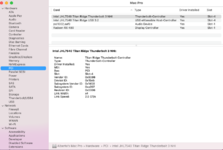
I see" Thunderbolt/USB4: No drivers are loaded. under system report and no Thunderbolt devices are recognized, I'm connecting my UA Apollo and no luck and recognizing it
 
I see" Thunderbolt/USB4: No drivers are loaded. under system report and no Thunderbolt devices are recognized, I'm connecting my UA Apollo and no luck and recognizing it
BTW no device was connected when I created the last report
 
I see" Thunderbolt/USB4: No drivers are loaded. under system report and no Thunderbolt devices are recognized, I'm connecting my UA Apollo and no luck and recognizing it
Is your Card flashed with a custom firmware? If yes, what version?
 

Latest posts

Forum statistics

Threads
1,948
Messages
18,016
Members
27,807
Latest member
pomchik_games