• Become a Premium Member for $25/year with no ads to improve your community experience. Upgrade to Pro Account for faster response and no wait times!

  • We regret to inform you that our server had an unexpected catastrophic failure and we lost the recent backups as well. The last healthy backups was restored of February 24, 2025. Members who have already registered, please consider a reregistration. Once re-registered, the memberships will be restored for those who have purchased a membership. We'll continue to monitor and send emails to assist you to have you onboard. Any inconvenience is highly regretted. Thank you for your continued support and participations.

    Sincerely, EliteMacx86

GUIDE How to Enable Intel Skylake Graphics (Intel HD Graphics 515, 520, 530, 540, 550 and 580) on macOS Ventura and Later

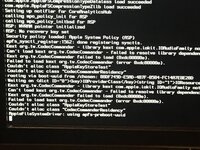
Broke booting. I'm stuck on the Apple logo with zero progress. I'll reenable verbose and see where it's hanging.
Disable CSM, and do Bus ID patching.

Cleanup is required too.
 
Got rid of CodecCommander and it still didn't boot all the way. Disabled CSM. I need to figure out patching, I looked at it briefly but didn't get it figured out just yet.
 
After apple boot logo there is no video signal in macOS Installer
 
Yes, i used all the patches provided in the forum
That is not the full framebuffer patching.

Read here:
 
I have a RX 560 and i5 6500 which has HD 530. I only need my iGPU for computing purposes. Do I have to spoof it? If yes, is there any difference in the device ID or framebuffer?
 
I have a RX 560 and i5 6500 which has HD 530. I only need my iGPU for computing purposes. Do I have to spoof it?
If on Ventura, then yes.

is there any difference in the device ID or framebuffer?
Yes, there is. The Device ID is basically the Device ID of the device and the framebuffer is basically the kexts under macOS which drives the display.
 
  • Like
Reactions: KVyDavid

Similar threads

Trending content

Forum statistics

Threads
1,926
Messages
17,856
Members
27,670
Latest member
Abdel11