• Become a Premium Member for $25/year with no ads to improve your community experience. Upgrade to Pro Account for faster response and no wait times!

  • We regret to inform you that our server had an unexpected catastrophic failure and we lost the recent backups as well. The last healthy backups was restored of February 24, 2025. Members who have already registered, please consider a reregistration. Once re-registered, the memberships will be restored for those who have purchased a membership. We'll continue to monitor and send emails to assist you to have you onboard. Any inconvenience is highly regretted. Thank you for your continued support and participations.

    Sincerely, EliteMacx86
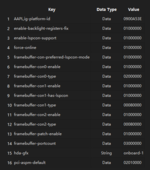
you mean I should config like that
1685080091876.png
Right ?
 
you mean I should config like that
View attachment 5893
Right ?
Remove portcount and aspm.
 
Remove portcount and aspm.
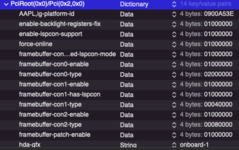
1685084058541.png
Is there any other problem?
I set con0 is LVDS, con1 is DP, con2 is HDMI
 
View attachment 5894
Is there any other problem?
I set con0 is LVDS, con1 is DP, con2 is HDMI
Looks fine. Restart, reset NVRAM and then test the ports.
 
Looks fine. Restart, reset NVRAM and then test the ports.
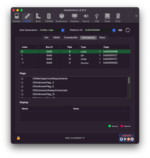
HDMI and DP port not working when I plug in cable into my laptop
1685084362442.png
 

Attachments

There is no DP Port. Type-C and HDMI only.

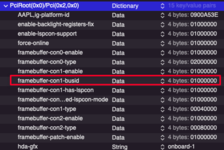
Add framebuffer-con1-busid = 01000000 and then check.
just con1, so then con2 ?
1685084762086.png
 
just con1, so then con2 ?
First con1.
 
First con1.
not working, I used port C and HDMI
note that i output port C through usb hub typeC
1685084955196.png
 

Forum statistics

Threads
1,953
Messages
18,044
Members
27,907
Latest member
jonnyrec