• Become a Premium Member for $25/year with no ads to improve your community experience. Upgrade to Pro Account for faster response and no wait times!

  • We regret to inform you that our server had an unexpected catastrophic failure and we lost the recent backups as well. The last healthy backups was restored of February 24, 2025. Members who have already registered, please consider a reregistration. Once re-registered, the memberships will be restored for those who have purchased a membership. We'll continue to monitor and send emails to assist you to have you onboard. Any inconvenience is highly regretted. Thank you for your continued support and participations.

    Sincerely, EliteMacx86

GUIDE How to Enable H.264 and HEVC/H.265 encoding on macOS

What's the FCP X and Compressor version?

Also, what's the encoding bit?
FCP X is 10.6.5, Compressor is 4.6.3 and encoding bit is 8 bit
 
FCP X is 10.6.5, Compressor is 4.6.3 and encoding bit is 8 bit
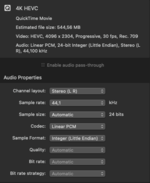
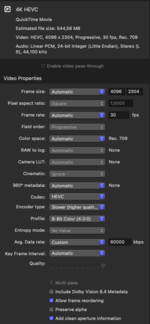
8-bit is supported. Provide the settings you're using for rendering.

Also, what codec are you exporting to?
 
8-bit is supported. Provide the settings you're using for rendering.

Also, what codec are you exporting to?
Here they are. This is one of my latest project. I'm exporting to .mov
 

Attachments

  • Screen Shot 2022-12-03 at 9.31.21 AM.png
    Screen Shot 2022-12-03 at 9.31.21 AM.png
    44 KB · Views: 4
  • Screen Shot 2022-12-03 at 9.32.25 AM.png
    Screen Shot 2022-12-03 at 9.32.25 AM.png
    79.8 KB · Views: 4
Here they are. This is one of my latest project. I'm exporting to .mov
Can you try using Handbrake?

You can also use QuickTime and then export it to HEVC and monitor the CPU usage in Activity Monitor.
 
Can you try using Handbrake?

You can also use QuickTime and then export it to HEVC and monitor the CPU usage in Activity Monitor.
I tried using Handbrake, it doesn't use my GPU at all!

I tried using QuickTime, it does use my GPU (1-3%) and about 4-8% of my CPU. It is like the PC doesn't care about exporting it. Exporting took about 15-20 minutes, based on QuickTime's estimated time, though. But it's not as fast as I export to HEVC on Windows
 
I tried using Handbrake, it doesn't use my GPU at all!

I tried using QuickTime, it does use my GPU (1-3%) and about 4-8% of my CPU. It is like the PC doesn't care about exporting it. Exporting took about 15-20 minutes, based on QuickTime's estimated time, though. But it's not as fast as I export to HEVC on Windows
That's weird. What's your GPU path?
 

Latest posts

Forum statistics

Threads
1,948
Messages
18,016
Members
27,807
Latest member
pomchik_games