• Become a Premium Member for $25/year with no ads to improve your community experience. Upgrade to Pro Account for faster response and no wait times!

  • We regret to inform you that our server had an unexpected catastrophic failure and we lost the recent backups as well. The last healthy backups was restored of February 24, 2025. Members who have already registered, please consider a reregistration. Once re-registered, the memberships will be restored for those who have purchased a membership. We'll continue to monitor and send emails to assist you to have you onboard. Any inconvenience is highly regretted. Thank you for your continued support and participations.

    Sincerely, EliteMacx86

[SOLVED] Need help with installing.

Status
Not open for further replies.
OMG!! It worked for me. Thank you very much. There is only one thing..

When i’m selecting the hard disk i want to install it on it says:

They are s.m.a.r.t-erros on this disk. This disk has hardware problems and can not be restored

what can i do to fix this?
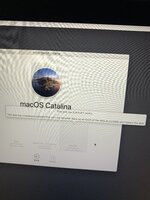
Attach a error screenshot.
 

Attachments

  • image.jpg
    image.jpg
    2 MB · Views: 242
See attachment for the screenshot
This is SMART error which simply means that the drive is failing. Backup your data, if any and replace the drive with a new one.
 
This is SMART error which simply means that the drive is failing. Backup your data, if any and replace the drive with a new one.

So that means I cannot install macOs Catalina on the drive and need to buy a new drive for that?
 
Hi, everything works fine, there is only one big problem..

my wifi connection is not working. How can I fix this?

edit: maybe better to say that there is not even a function related to wifi or internet cable.

Also noticed that:
  1. Sound is not working
  2. Mousepad (the one build in the laptop) is not working
Another question, how can i install that i’ t will start the macOS installation without going to boot everytime again?
 
Last edited:
Hi, everything works fine, there is only one big problem..

my wifi connection is not working. How can I fix this?

edit: maybe better to say that there is not even a function related to wifi or internet cable.

Also noticed that:
  1. Sound is not working
  2. Mousepad (the one build in the laptop) is not working
Another question, how can i install that i’ t will start the macOS installation without going to boot everytime again?
Off-topic. Create a separate thread for the rest of the issues.
 
Status
Not open for further replies.

Latest posts

Forum statistics

Threads
1,948
Messages
18,016
Members
27,807
Latest member
pomchik_games