• Become a Premium Member for $25/year with no ads to improve your community experience. Upgrade to Pro Account for faster response and no wait times!

  • We regret to inform you that our server had an unexpected catastrophic failure and we lost the recent backups as well. The last healthy backups was restored of February 24, 2025. Members who have already registered, please consider a reregistration. Once re-registered, the memberships will be restored for those who have purchased a membership. We'll continue to monitor and send emails to assist you to have you onboard. Any inconvenience is highly regretted. Thank you for your continued support and participations.

    Sincerely, EliteMacx86

HP Pavilion G6 1250ej

Status
Not open for further replies.
So, can you recommend a couple of WiFi+Bluetooth Mini PCIe cards?
(If you can, send the model names of ones that support 5GHz as well. I’ll choose one depending on the price and performance).
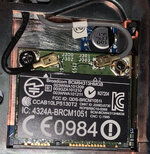
 
And there is not a lot of space in this Mini PCIe slot so I can’t fit bigger network cards.
 

Attachments

  • 8DAE9B5F-C0F2-4C97-B08B-E02C11F03BB6.jpeg
    8DAE9B5F-C0F2-4C97-B08B-E02C11F03BB6.jpeg
    1 MB · Views: 149
Some HP laptops do have that whitelist.
Yeah, they do have.
Btw, the Broadcom one I asked you about was the one I have already. But I think that it’s not supported under MacOS.
No, already mentioned, not supported. Buy Broadcom BCM94352HMB, Half Mini PCIe.
 
So, can you recommend a couple of WiFi+Bluetooth Mini PCIe cards?
(If you can, send the model names of ones that support 5GHz as well. I’ll choose one depending on the price and performance).
I only suggest Broadcom BCM94352HMB, Half Mini PCIe.
 
Ok, I'll order it.
It will probably take a month until I get it.
 
Hey, do you know how to fix the sleep mode?
rn, When I press the sleep button (in MacOS), the screen turns black but the laptop keeps running and I can't wake it from sleep. If I want to get back to MacOS I have to power off the laptop (by holding the power button) and then turning it back on.

And when I am closing the lid, it doesn't put the laptop into sleep mode. Instead it just turns off the screen until I open the lid again.
 
Status
Not open for further replies.

Latest posts

Forum statistics

Threads
1,948
Messages
18,016
Members
27,807
Latest member
pomchik_games