

- Joined
- Jan 12, 2026
- Messages
- 3
- Motherboard
- Dell G15
- CPU
- Ryzen 5 5600H
- Graphics
- Ryzen 5 5600H
- OS X/macOS
- 15.x
- Bootloader
- OpenCore (UEFI)
- Mac
- iMac Pro
- Mobile Phone
- Android
I have dell g15 5515 (RTX 3050 4GB + AMD Cezanne Radeon Vega Mobile Series, 5600H) with linux (arch btw), followed the https://github.com/kholia/OSX-KVM, and got a working setup, but purely on cpu, which is good enough, but It would be better to have a little smoothness, so thought of trying out GPU passthrough with VFIO.

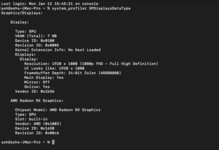
I think I am paritally successful, but then what? I am stuck here.
I am using the virtual frame buffer, how do I make the GPU get used, how do I attach a display to it? virtually (or physically? if possible, but its a laptop with IGPU)
config.plist : https://pastebin.com/xm8LiPPU
slightly modified OpenCore-Boot.sh:
I think I am paritally successful, but then what? I am stuck here.
I am using the virtual frame buffer, how do I make the GPU get used, how do I attach a display to it? virtually (or physically? if possible, but its a laptop with IGPU)
config.plist : https://pastebin.com/xm8LiPPU
slightly modified OpenCore-Boot.sh:
Code:
MY_OPTIONS="+ssse3,+sse4.2,+popcnt,+avx,+aes,+xsave,+xsaveopt,check"


# This script works for Big Sur, Catalina, Mojave, and High Sierra. Tested with

# macOS 10.15.6, macOS 10.14.6, and macOS 10.13.6.


ALLOCATED_RAM="8192" # MiB

CPU_SOCKETS="1"

CPU_CORES="4"

CPU_THREADS="8"


REPO_PATH="."

OVMF_DIR="."


# shellcheck disable=SC2054

args=(

  -enable-kvm -m "$ALLOCATED_RAM" \

  -cpu Haswell-noTSX,kvm=on,vendor=GenuineIntel,+invtsc,vmware-cpuid-freq=on,"$MY_OPTIONS"

  -smp "$CPU_THREADS",cores="$CPU_CORES",sockets="$CPU_SOCKETS"


  # -cpu host,kvm=on,+invtsc,topoext=on \

  # -smp cores="$CPU_CORES",threads="$CPU_THREADS",sockets="$CPU_SOCKETS" \


  # -cpu host,kvm=on,"$MY_OPTIONS"

  -machine q35

  -device qemu-xhci,id=xhci

  -device usb-kbd,bus=xhci.0 -device usb-tablet,bus=xhci.0


  # -smp cores=4,sockets=1,threads=1


  # -device usb-ehci,id=ehci

  # -device usb-kbd,bus=ehci.0

  # -device usb-mouse,bus=ehci.0

  # -device nec-usb-xhci,id=xhci

  # -global nec-usb-xhci.msi=off

  # -global ICH9-LPC.acpi-pci-hotplug-with-bridge-support=off

  # -device usb-host,vendorid=0x8086,productid=0x0808  # 2 USD USB Sound Card

  # -device usb-host,vendorid=0x1b3f,productid=0x2008  # Another 2 USD USB Sound Card

  -device isa-applesmc,osk="ourhardworkbythesewordsguardedpleasedontsteal(c)AppleComputerInc"

  -drive if=pflash,format=raw,readonly=on,file="$REPO_PATH/$OVMF_DIR/OVMF_CODE.fd"

  -drive if=pflash,format=raw,file="$REPO_PATH/$OVMF_DIR/OVMF_VARS-1920x1080.fd"

  -smbios type=2

  -device ich9-intel-hda -device hda-duplex

  -device ich9-ahci,id=sata

  -drive id=OpenCoreBoot,if=none,format=qcow2,file="$REPO_PATH/OpenCore/OpenCore.qcow2"

  -device ide-hd,bus=sata.2,drive=OpenCoreBoot

  -device ide-hd,bus=sata.3,drive=InstallMedia

  -drive id=InstallMedia,if=none,file="$REPO_PATH/BaseSystem.img",format=raw

  -drive id=MacHDD,if=none,file="$REPO_PATH/mac_hdd_ng.img",format=qcow2

  -device ide-hd,bus=sata.4,drive=MacHDD

  # -netdev tap,id=net0,ifname=tap0,script=no,downscript=no -device virtio-net-pci,netdev=net0,id=net0,mac=52:54:00:c9:18:27

  -netdev user,id=net0,hostfwd=tcp::2222-:22 -device virtio-net-pci,netdev=net0,id=net0,mac=02:f4:a1:07:3a:0a

  # -netdev user,id=net0 -device vmxnet3,netdev=net0,id=net0,mac=52:54:00:c9:18:27  # Note: Use this line for High Sierra

  -monitor stdio

  # -device vmware-svga

  -vga qxl \

  # -device ramfb \


  -device vfio-pci,host=06:00.0,multifunction=on,x-vga=on \

  -device vfio-pci,host=06:00.1  \


  # -device qxl-vga,vgamem_mb=512


  -serial file:/tmp/vm-serial.log


  # -display none  \


  # -device virtio-vga,ram_size=512M

  # -device vmware-svga,vgamem_mb=128 \

  # -device ramfb

  # -vnc :1 -k en-us


  # -device vmware-svga \

  # -spice port=5900,addr=127.0.0.1,disable-ticketing=on

)


qemu-system-x86_64 "${args[@]}"


