• Become a Premium Member for $25/year with no ads to improve your community experience. Upgrade to Pro Account for faster response and no wait times!

  • We regret to inform you that our server had an unexpected catastrophic failure and we lost the recent backups as well. The last healthy backups was restored of February 24, 2025. Members who have already registered, please consider a reregistration. Once re-registered, the memberships will be restored for those who have purchased a membership. We'll continue to monitor and send emails to assist you to have you onboard. Any inconvenience is highly regretted. Thank you for your continued support and participations.

    Sincerely, EliteMacx86

SOLVED Sonoma 14.4 Stage 2 Install Problem

Status
Not open for further replies.
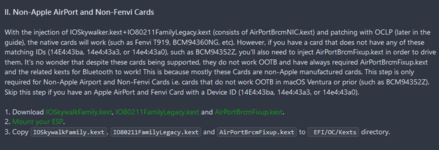
Ok so I kinda figured it out. It conflicts with your Sonoma WiFi patch. I had to disable AirportBRCMfixup and NICinjector kexts and that exclusion of com.apple.SkywalkIOFamily in Kernel->Block. Now it boots perfectly fine but WiFi isn't working. This is the EFI which allows me to boot 14.4. Also i had to use restrict events with revpatch argument to get back the update cause they broke and didn't show up. I've made 2 separate OC configs to boot between 14.3.1 and 14.4 but we still have to figure out how to fix WiFi.
 

Attachments

Last edited:
Ok so I kinda figured it out. It conflicts with your Sonoma WiFi patch. I had to disable AirportBRCM and NIC injector kexts and that exclusion of com.apple.SkywalkIOFamily in Kernel->Block. Now it boots perfectly fine but WiFi isn't working. This is the EFI which allows me to boot 14.4. Also i had to use restrict events with revpatch argument to get back the update cause they broke and didn't show up. I've made 2 separate OC configs to boot between 14.3.1 and 14.4 but we still have to figure out how to fix WiFi.
Of course, the WiFi guide for Sonoma does not says to use the Kexts you used. Hence, the loop.

Regarding the WiFi, see here:
 
Of course, the WiFi guide for Sonoma does not says to use the Kexts you used. Hence, the loop.

Regarding the WiFi, see here:
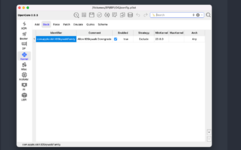
Really? Because I have BCM94352Z and followed this: 1710680606417.png
 
But AirPortBcrmFixup and its NICInjector plugin when enabled as well as 1710680814294.png
won't allow it to boot
 
Hi everyone,
I have a problem with SecureBootModel. When set to Disabled only one entry Windows can boot. Any other entries like macOS or Install macOS, although present in the OC boot menu cannot be booted. With the SBM set to Default Windows and Sonoma 14.3.1 boot correctly. Of course 14.4 shows the above described behaviour. What may be wrong with my setup (OC-0.9.9 kext updated). Is something missing in my config.plist?
Thanks for any help.

Attachments​

 
OK, it is solved by adding:
UEFI - Qirks - DisableSecurityPolicy = TRUE
 
Status
Not open for further replies.

Latest posts

Forum statistics

Threads
1,948
Messages
18,016
Members
27,807
Latest member
pomchik_games