• Become a Premium Member for $25/year with no ads to improve your community experience. Upgrade to Pro Account for faster response and no wait times!

  • We regret to inform you that our server had an unexpected catastrophic failure and we lost the recent backups as well. The last healthy backups was restored of February 24, 2025. Members who have already registered, please consider a reregistration. Once re-registered, the memberships will be restored for those who have purchased a membership. We'll continue to monitor and send emails to assist you to have you onboard. Any inconvenience is highly regretted. Thank you for your continued support and participations.

    Sincerely, EliteMacx86

[GUIDE] How to Create Windows 10 Installation USB on Windows

Gbilato

Moderator
Staff member
Donator
Joined
Aug 7, 2018
Messages
13
Motherboard
Hewlett-Packard
CPU
i7-5500u
Graphics
Intel HD Graphics 5500 + nVidia GTX950m
OS X/macOS
10.15.x
Bootloader
  1. Clover (UEFI)
Mac
  1. iMac
  2. iMac Pro
  3. Mac Pro
  4. MacBook
  5. MacBook Pro
Mobile Phone
  1. Android
  2. iOS
  3. Other
How to do a Windows 10 Installation USB on Windows
Let's start downloading Rufus from here.
Connect your USB stick with almost 8GB or more, and make a backup of the data you've on it. Rufus while started to do the USB stick, will erase the whole USB stick.
In Rufus, select the USB stick, the ISO image and leave all the settings as they are.
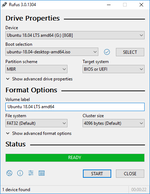
rufus.png

When finished, click on Start and go to grab a coffee. It will take about 10-15 minutes.
When the green bar says "READY" and it's full, you're done!
 

Latest posts

Forum statistics

Threads
1,948
Messages
18,016
Members
27,807
Latest member
pomchik_games