• Become a Premium Member for $25/year with no ads to improve your community experience. Upgrade to Pro Account for faster response and no wait times!

Dell XPS 13 i7-1065G7 Video Memory Stuck at 35MB after patchig DMVT Monterrey

banditch_

New member
Joined
Jan 31, 2026
Messages
5
Motherboard
Dell XPS 13 7930 2 in 1
CPU
i7-1065G7
Graphics
Iris Plus Graphics
OS X/macOS
12.x
Bootloader
  1. OpenCore (UEFI)
Mac
  1. MacBook Air
Mobile Phone
  1. iOS
EFI: Hardware
  • Model: Dell XPS 13 7390 2-in-1
  • CPU: Intel i7-1065G7 (Ice Lake, Iris Plus G7)
  • iGPU: Device-ID 0x8A52
  • BIOS: 1.9.1 (InsydeH2O)
  • macOS: Monterey
  • Bootloader: OpenCore
Problem
No matter what I do, VRAM is stuck at 35MB and the system behaves like it’s only partially accelerated:


  • Dock is not transparent
  • UI animations stutter badly (Mission Control, app minimization, Safari previews, dictionary popups)
  • System freezes for a few seconds during animations
  • About This Mac shows ~35MB VRAM
  • Clearly not proper Metal acceleration behavior

  • System boots and runs
  • No kernel panics with the correct framebuffer
  • Removing -igfxvesa and fallback args exposes the real issue
  • Graphics acceleration appears partial at best
  • BIOS does not expose DVMT options
  • Used GRUB setup_var to patch DVMT
  • Variables confirmed writable (5C0 / 5C1 etc)
  • DVMT changes do not affect VRAM reporting in macOS
  • Variable 0x785 (mentioned in older XPS guides) exists but reads 0x00
  • Unsure if touching 0x785 on Ice Lake / this BIOS is safe or relevant
  • iGPU correctly identified as Intel Iris Plus Graphics
  • Device-ID shows 8A52
  • AAPL,ig-platform-id sometimes shows ffffffff despite injection
  • Metal plugin loads, but behavior suggests fallback or incorrect memory layout

Questions i have:
  • Why is VRAM hard-capped at 35MB on this Ice Lake system?
  • Is there a missing Ice Lake–specific DVMT or memory variable on Dell XPS 7390?
  • Is BIOS variable 0x785 relevant for Ice Lake, or is that Skylake/Kaby Lake only?
  • Why does the same framebuffer config work on identical hardware but not here?
  • Is this a firmware lock, not a macOS config issue?
  • Can i get acceleration working???
 
EFI: Hardware
  • Model: Dell XPS 13 7390 2-in-1
  • CPU: Intel i7-1065G7 (Ice Lake, Iris Plus G7)
  • iGPU: Device-ID 0x8A52
  • BIOS: 1.9.1 (InsydeH2O)
  • macOS: Monterey
  • Bootloader: OpenCore
Problem
No matter what I do, VRAM is stuck at 35MB and the system behaves like it’s only partially accelerated:


  • Dock is not transparent
  • UI animations stutter badly (Mission Control, app minimization, Safari previews, dictionary popups)
  • System freezes for a few seconds during animations
  • About This Mac shows ~35MB VRAM
  • Clearly not proper Metal acceleration behavior

  • System boots and runs
  • No kernel panics with the correct framebuffer
  • Removing -igfxvesa and fallback args exposes the real issue
  • Graphics acceleration appears partial at best
  • BIOS does not expose DVMT options
  • Used GRUB setup_var to patch DVMT
  • Variables confirmed writable (5C0 / 5C1 etc)
  • DVMT changes do not affect VRAM reporting in macOS
  • Variable 0x785 (mentioned in older XPS guides) exists but reads 0x00
  • Unsure if touching 0x785 on Ice Lake / this BIOS is safe or relevant
  • iGPU correctly identified as Intel Iris Plus Graphics
  • Device-ID shows 8A52
  • AAPL,ig-platform-id sometimes shows ffffffff despite injection
  • Metal plugin loads, but behavior suggests fallback or incorrect memory layout

Questions i have:
  • Why is VRAM hard-capped at 35MB on this Ice Lake system?
  • Is there a missing Ice Lake–specific DVMT or memory variable on Dell XPS 7390?
  • Is BIOS variable 0x785 relevant for Ice Lake, or is that Skylake/Kaby Lake only?
  • Why does the same framebuffer config work on identical hardware but not here?
  • Is this a firmware lock, not a macOS config issue?
  • Can i get acceleration working???
Attach your EFI to check
 
  • Like
Reactions: banditch_

Attachments

i reflashed the bios version was 1.9.1 and still hangs with the same behaivour i dont know what variables are dvmt prealloc and can't change them i tried to use linux to find what variable to find but i couldn't

EDIT: i search in the bios update executable and found dvmt prealloc is actually 0x04 wich is write protected and cant be changed neither through bios config or efi using modGrub.efi
 
Last edited:
i reflashed the bios version was 1.9.1 and still hangs with the same behaivour i dont know what variables are dvmt prealloc and can't change them i tried to use linux to find what variable to find but i couldn't

EDIT: i search in the bios update executable and found dvmt prealloc is actually 0x04 wich is write protected and cant be changed neither through bios config or efi using modGrub.efi
What's the default DVMT memory size? Extract BIOS and attach it to check.
 
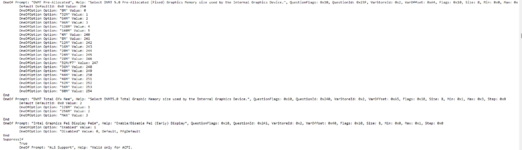
default is 0MB i think i managed to change it to 32 with setup_var but its the most it lets me, other values return error 1770112034261.png
 

Attachments

Forum statistics

Threads
2,185
Messages
20,064
Members
30,664
Latest member
Eckho