• Become a Premium Member for $25/year with no ads to improve your community experience. Upgrade to Pro Account for faster response and no wait times!

  • We regret to inform you that our server had an unexpected catastrophic failure and we lost the recent backups as well. The last healthy backups was restored of February 24, 2025. Members who have already registered, please consider a reregistration. Once re-registered, the memberships will be restored for those who have purchased a membership. We'll continue to monitor and send emails to assist you to have you onboard. Any inconvenience is highly regretted. Thank you for your continued support and participations.

    Sincerely, EliteMacx86

Asus UX501VW | Intel Core i7-6700HQ | 16GB RAM | Intel UHD Graphics 530 | 4K display

hamed

New member
Joined
Aug 5, 2021
Messages
10
Motherboard
Asus UX501VW
CPU
Core I7 6700HQ
Graphics
Intel HD530
OS X/macOS
13.x
Bootloader
  1. OpenCore (UEFI)
Mac
  1. iMac Pro
Mobile Phone
  1. iOS
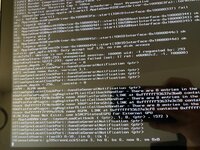
Hello everyone, I successfully installed Big Sur on Asus UX501VW with an external monitor connected to HDMI, but the internal UHD display doesn't work and after booting it shows some text and freezes until I connect the external monitor, but the graphics accelerator works well with the external monitor, how can I make the internal monitor work with 4K or just full HD?

I attached the OpenCore EFI.

Thanks.
 

Attachments
  • WhatsApp Image 2021-07-22 at 12.51.13.jpeg
    WhatsApp Image 2021-07-22 at 12.51.13.jpeg
    160.8 KB · Views: 101
Last edited:
Hello everyone, I successfully installed Big Sur on Asus UX501VW with an external monitor connected to HDMI, but the internal UHD display doesn't work and after booting it shows some text and freezes until I connect the external monitor, but the graphics accelerator works well with the external monitor, how can I make the internal monitor work with 4K or just full HD?

I attached the OpenCore EFI.

Thanks.
Fix your profile information first. For 4K and UHD, additional steps are required to make the display working and since Big Sur, you either need to use a supported ig-platform-id or calculate the EDID and patch it to support 4K. Provide your BIOS settings and display information including refresh rate and resolution.
 
Fix your profile information first. For 4K and UHD, additional steps are required to make the display working and since Big Sur, you either need to use a supported ig-platform-id or calculate the EDID and patch it to support 4K. Provide your BIOS settings and display information including refresh rate and resolution.
BIOS settings are attached.

and my display is a
15.60 inch 16:9, 3840 x 2160 pixel, 10-point capacitive, IPS, ID: LGD04D4, Name: LP156UD1-SPB1, glossy: yes; Frequency 60Hz

what should I do?
 

Attachments

Last edited:
BIOS settings are attached.

and my display is a
15.60 inch 16:9, 3840 x 2160 pixel, 10-point capacitive, IPS, ID: LGD04D4, Name: LP156UD1-SPB1, glossy: yes; Frequency 60Hz

what should I do?
Any thoughts?
Your BIOS settings is wrong!

Enable Intel Virtualization Technology
Enable SMART Self Test
Set DVMT Pre-Alloc to 64MB
 
  • Like
Reactions: hamed
Your BIOS settings is wrong!

Enable Intel Virtualization Technology
Enable SMART Self Test
Set DVMT Pre-Alloc to 64MB

The solution was to add this igfxonln=1 into boot arguments.
 

Latest posts

Forum statistics

Threads
1,948
Messages
18,016
Members
27,807
Latest member
pomchik_games