• Become a Premium Member for $25/year with no ads to improve your community experience. Upgrade to Pro Account for faster response and no wait times!

Kernel Panic AppleACPIPlatform in Ventura

glucas

New member
Premium Member
Joined
Apr 8, 2023
Messages
9
Motherboard
z690
CPU
i7 12700
Graphics
6600
OS X/macOS
14.x
Mobile Phone
  1. iOS
Hi can you help, I've been trying to figure out this issue for days,
Kernel Panic AppleACPIPlatform on Ventura
The docs from dortania did not help as well: https://dortania.github.io/OpenCore...tml#kernel-panic-appleintelcpupowermanagement

Here's a screenshot of that error.

1681084558716.png

Im using OpenCore-0.8.8-RELEASE

Here's my EFI https://drive.google.com/file/d/1iL_awDuJu6nDTtC2ELTrTGnAXY1s7oTR/view?usp=sharing

Specs:

CPU: i7 12700k Alderlake
Motherboard: Asus z690-i wifi
RAM: 32gb DDR5 kingston Fury
GPU: Radeon 6600
 

Attachments

  • 1681082376753.png
    1681082376753.png
    3 MB · Views: 20
Last edited:
Hi can you help, I've been trying to figure out this issue for days,
Kernel Panic AppleACPIPlatform on Ventura
The docs from dortania did not help as well: https://dortania.github.io/OpenCore...tml#kernel-panic-appleintelcpupowermanagement

Here's a screenshot of that error.
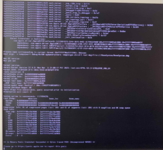
View attachment 5710

Im using OpenCore-0.8.8-RELEASE

Here's my EFI https://drive.google.com/file/d/1iL_awDuJu6nDTtC2ELTrTGnAXY1s7oTR/view?usp=sharing

Specs:

CPU: i7 12700k Alderlake
Motherboard: Asus z690-i wifi
RAM: 32gb DDR5 kingston Fury
GPU: Radeon 6600
Your configuration is not as per the guide.

Start here:
 
Your configuration is not as per the guide.

Start here:
while I was waiting for your reply I already started using this guide.

Do you think I should stop my progress here and use your guide?
we almost have the same specs
 
while I was waiting for your reply I already started using this guide.

Do you think I should stop my progress here and use your guide?
we almost have the same specs
You should be good with the above guide. It's more specific for Alder Lake builds.
 
You should be good with the above guide. It's more specific for Alder Lake builds.
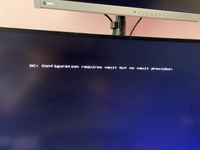
Hi! I followed the instructions but now I get this message
1681181699155.png

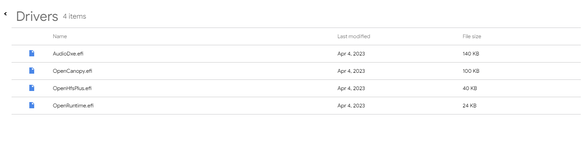
this is the contents of my usb installer
and this is my EFI folder

1681181845911.png


And when I change the value of the vault from "Misc-> Vault" to "Optional" that message was gone but there's no option to install the OS just resetNVRAM


Opencore: OpenCore-0.9.1-RELEASE
OS: Ventura
 
Last edited:
Hi! I followed the instructions but now I get this message
View attachment 5714

this is the contents of my usb installer
and this is my EFI folder

View attachment 5715


And when I change the value of the vault from "Misc-> Vault" to "Optional" that message was gone but there's no option to install the OS just resetNVRAM


Opencore: OpenCore-0.9.1-RELEASE
OS: Ventura
Your configuration is still not as per the guide. Seems like the cleaning part has been totally skipped.
 
Your configuration is still not as per the guide. Seems like the cleaning part has been totally skipped.
I did not skip the cleaning. I removed all the unwanted drivers and left only what I need.
can you see the EFI on my google drive?

1681193143213.png
 
I did not skip the cleaning. I removed all the unwanted drivers and left only what I need.
can you see the EFI on my google drive?

View attachment 5716
Read here:
 
  • Like
Reactions: glucas
Read here:
Hi Thanks for the reply, I updated my EFI based on your guide.
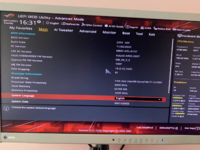
But now it wont even boot, when I try to boot on the usb it just returns me to the BIOS

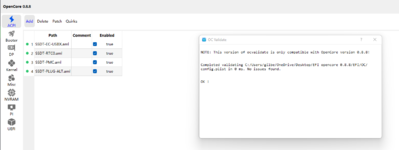
1681202049265.png

1681202276438.png


Note: this is opencore 0.8.8 because I can only find same version of this (OCAT)
 

Attachments

Last edited:
Hi Thanks for the reply, I updated my EFI based on your guide.
But now it wont even boot, when I try to boot on the usb it just returns me to the BIOS

View attachment 5717

View attachment 5719


Note: this is opencore 0.8.8 because I can only find same version of this (OCAT)
The basic rule is you must use the same version of OpenCore, config.plist and the XML Editor. To avoid issues, grab OpenCorePkg and copy the sample.plist and then start editing it as per the guide. It's all well explained in the guide.
 

Forum statistics

Threads
2,215
Messages
20,356
Members
30,929
Latest member
Rhombus