
• Become a Premium Member for $25/year with no ads to improve your community experience. Upgrade to Pro Account for faster response and no wait times!

Need help with Cirrus Logic CS8409 on Inspiron 3505

Aditya

New member
Joined
Nov 13, 2022
Messages
9
Motherboard
Dell Inspiron 3505
CPU
AMD Ryzen 5 3450U
Graphics
AMD Radeon Vega 8
OS X/macOS
14.x
Bootloader
  1. OpenCore (UEFI)
Mobile Phone
  1. Android
  2. Windows Phone
Hi, I've been able to successfully install hackintosh macOS Ventura on my Dell Inspiron 3505 (Ryzen 5 3450U, 8+256, Vega 8). However, audio is not working despite using AppleALC with many tested alcid ids. (tried about 40). Also VoodooHDA is also not working, despite SIP disabled and the kext loading up, audio output does not show.

Kindly help on how to get this audio part working.

Note that this laptop also uses Realtek ALC3204 for HDMI audio. CS is responsible for speakers and headphone output.

Screenshot of audio tab in Hackintool attached below.
1769968717053.png

Thanks.
 
Hi, I've been able to successfully install hackintosh macOS Ventura on my Dell Inspiron 3505 (Ryzen 5 3450U, 8+256, Vega 8). However, audio is not working despite using AppleALC with many tested alcid ids. (tried about 40). Also VoodooHDA is also not working, despite SIP disabled and the kext loading up, audio output does not show.

Kindly help on how to get this audio part working.

Note that this laptop also uses Realtek ALC3204 for HDMI audio. CS is responsible for speakers and headphone output.

Screenshot of audio tab in Hackintool attached below.
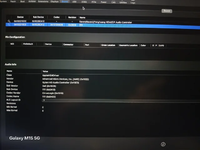
View attachment 9973

Thanks.
You'll have to patch IRQ.
 
You'll have to patch IRQ.
Kindly guide me or atleast link me to a guide that help me do the same.

Also just asking, is it a hassle or time consuming job? I have irl deadlines and in such a case I will do it later.

Edit: also, will this method guarantee get my audio working?
 
Kindly guide me or atleast link me to a guide that help me do the same.

Also just asking, is it a hassle or time consuming job? I have irl deadlines and in such a case I will do it later.

Edit: also, will this method guarantee get my audio working?
 
Done. Patched IRQ, added HPET aml and also made necessary changes to config.plist. Now what to do next? Should I keep AppleALC.kext in kexts? And if so, what alcid to use in boot-args? If not, what to do?
 
Done. Patched IRQ, added HPET aml and also made necessary changes to config.plist. Now what to do next? Should I keep AppleALC.kext in kexts? And if so, what alcid to use in boot-args? If not, what to do?
Of course, you need the AppleALC.kext in the EFI/OC/Kexts directory. Plus, the Audio layout should be according to your audio codec.
 
My audio codec (Cirrus Logic CS8409) is not on AppleALC's list of supported audio codecs.
Any other method?
 
Of course, you need the AppleALC.kext in the EFI/OC/Kexts directory. Plus, the Audio layout should be according to your audio codec.
My audio codec (Cirrus Logic CS8409) is not on AppleALC's list of supported audio codecs.
Any other method?
 

Forum statistics

Threads
2,184
Messages
20,055
Members
30,662
Latest member
19_triage.sheaves