• Become a Premium Member for $25/year with no ads to improve your community experience. Upgrade to Pro Account for faster response and no wait times!

  • We regret to inform you that our server had an unexpected catastrophic failure and we lost the recent backups as well. The last healthy backups was restored of February 24, 2025. Members who have already registered, please consider a reregistration. Once re-registered, the memberships will be restored for those who have purchased a membership. We'll continue to monitor and send emails to assist you to have you onboard. Any inconvenience is highly regretted. Thank you for your continued support and participations.

    Sincerely, EliteMacx86
Probably the mosfet is defective i guess.
Well i don't know what that means :LOL: but maybe that might explain why the time is never correct in my windows 10... it's always an hour behind no matter the settings i do, i even disabled automatic time zone , daylight savings and auto time update set it to a time zone that's one hour ahead yet no luck.
 
I tried to extract using the command "iasl -da -dl -fe refs.txt DSDT.aml SSDT*.aml" after creating the refs.txt, here's the log and my origin folder.
 

Attachments

Well i don't know what that means :LOL: but maybe that might explain why the time is never correct in my windows 10... it's always an hour behind no matter the settings i do, i even disabled automatic time zone , daylight savings and auto time update set it to a time zone that's one hour ahead yet no luck.
I explained what it does.
 
  • Like
Reactions: Chucksmmadu
Notes were there. Probably, you didn't read or didn't understood.

Which battery patch you applied?

Yes, of course. Read here:

Scroll down to SSDT patch.
Ok, I get origin again, disassembled them and open DSDT with MaciASL but there no patch in list now and it's empty !!! I removed MaciASL with AppCleaner reboot and download it again and placed in applications but when I open patch menu noting is there !! Why is that and how can I fix it ? :rolleyes:
 
Last edited:
Ok, I get origin again, disassembled them and open DSDT with MaciASL but there no patch in list now and it's empty !!! I removed MaciASL with AppCleaner reboot and download it again and placed in applications but when I open patch menu noting is there !! Why is that and how can I fix it ? :rolleyes:
Check MaciASL preferences for the repo.
 
You need to patch DSDT for it. Read here:
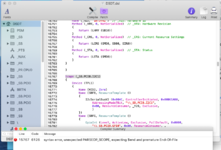
as in guide when I do this patch I2C Controllers [SKL] got this error in compile : attached photo
15767, 6126, syntax error, unexpected PARSEOP_SCOPE, expecting $end and premature End-Of-File
so I didn't patch it and just used this patch : GPIO Controller Enable SKL+

I patched Battery with : [bat] Asus N55SL/VivoBook - NOT WORKED
 

Attachments

  • Screenshot 2019-12-11 at 3.44.13 PM.png
    Screenshot 2019-12-11 at 3.44.13 PM.png
    274.4 KB · Views: 242
Last edited:
as in guide when I do this patch I2C Controllers [SKL] got this error in compile :
15767, 6126, syntax error, unexpected PARSEOP_SCOPE, expecting $end and premature End-Of-File
This patch is only for Skylake. You're having a Kaby lake system. So the patch doesn't applies to your Laptop.
 
I tried to extract using the command "iasl -da -dl -fe refs.txt DSDT.aml SSDT*.aml" after creating the refs.txt, here's the log and my origin folder.

Please what do you think about this???
 

Latest posts

Forum statistics

Threads
1,948
Messages
18,016
Members
27,807
Latest member
pomchik_games