• Become a Premium Member for $25/year with no ads to improve your community experience. Upgrade to Pro Account for faster response and no wait times!

  • We regret to inform you that our server had an unexpected catastrophic failure and we lost the recent backups as well. The last healthy backups was restored of February 24, 2025. Members who have already registered, please consider a reregistration. Once re-registered, the memberships will be restored for those who have purchased a membership. We'll continue to monitor and send emails to assist you to have you onboard. Any inconvenience is highly regretted. Thank you for your continued support and participations.

    Sincerely, EliteMacx86

Problem with HD 4600

Iura2204

New member
Joined
Sep 22, 2024
Messages
5
Motherboard
GA Z390M
CPU
Intel i5-9600KF
Graphics
Asus RX 6700XT
OS X/macOS
13.x
Bootloader
  1. OpenCore (UEFI)
Mac
  1. iMac
Mobile Phone
  1. iOS
Hi guys.
I need your help.
So, I had an idea to install MAC OS Monterey on All-in-One PCS MSI AP200
I upgraded it a bit, installed I3 4360 processor, increased RAM to 16 GB, and have plan install wifi + bt card BCM94352Z.
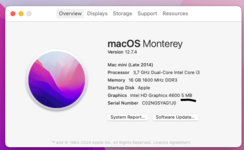
I created EFI folder using OpenCore Siimplify (added files for Legacy boot) and everything seems to be fine, but I can't start HD 4600 graphics.
Please tell me what to do? What am I missing?
A screenshot of my problem and EFI folder are attached
 

Attachments

  • Screenshot 2025-02-15 at 12.17.13.png
    Screenshot 2025-02-15 at 12.17.13.png
    92.4 KB · Views: 7
  • Screenshot 2025-02-15 at 12.18.49.png
    Screenshot 2025-02-15 at 12.18.49.png
    32.1 KB · Views: 7
  • EFI.zip
    EFI.zip
    5.6 MB · Views: 6
Hi guys.
I need your help.
So, I had an idea to install MAC OS Monterey on All-in-One PCS MSI AP200
I upgraded it a bit, installed I3 4360 processor, increased RAM to 16 GB, and have plan install wifi + bt card BCM94352Z.
I created EFI folder using OpenCore Siimplify (added files for Legacy boot) and everything seems to be fine, but I can't start HD 4600 graphics.
Please tell me what to do? What am I missing?
A screenshot of my problem and EFI folder are attached
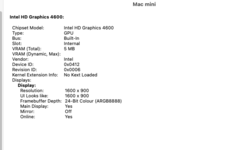
Ensure you have set DVMT as 64MB in BIOS and remove framebuffer-stolenmem entry from the IGPU device properties. In addition, also remove -igfxvesa from boot args.
 
Ensure you have set DVMT as 64MB in BIOS and remove framebuffer-stolenmem entry from the IGPU device properties. In addition, also remove -igfxvesa from boot args.
Boot argument removed.
I can't set DVMT as 64 MB in BIOS. There is no such function
 
Boot argument removed.
I can't set DVMT as 64 MB in BIOS. There is no such function
In that case, set the framebuffer-stolenmem as 00003001
 
Unfortunately it doesn't help.
When deleting -igfxvesa, a black screen where the apple should be
 
Unfortunately it doesn't help.
When deleting -igfxvesa, a black screen where the apple should be
You need to patch the framebuffer then. Also, you'll need to add SSDT-PNLF for the brightness.
 
hank you. Could you provide a link to the patch manual?
 
hank you. Could you provide a link to the patch manual?
 

Latest posts

Forum statistics

Threads
1,948
Messages
18,016
Members
27,807
Latest member
pomchik_games