

- Joined
- Jul 22, 2018
- Messages
- 8,449
- Motherboard
- Supermicro X11SPA-T
- CPU
- Intel Xeon W-3275 28 Core
- Graphics
- 2xAMD RX 580 8GB
- OS X/macOS
- 13.x
- Bootloader
- OpenCore (UEFI)
- Mac
- Mac mini
- MacBook Pro
- Mobile Phone
- Android
- iOS
How to Reset NVRAM [Clover/OpenCore]
This guide describes how to reset NVRAM using Clover and OpenCore. By following this guide, you'll be able to reset NVRAM for Clover or OpenCore bootloader. A reset of NVRAM might be required in several cases to clear off the variables stored in the NVRAM. To reset NVRAM, follow the steps below.Clover
If you're using Clover as a bootloader, follow the steps below to reset the NVRAM.
1. Turn on your target system
2. Boot into Clover
3. When at the Clover menu, press
F11 to clear NVRAM.NOTE: This process will clear the NVRAM (native and emulated) variables stored. Once cleared, the system will automatically restart.
OpenCore
If you're using OpenCore as a bootloader, follow the steps below to reset the NVRAM.
1. Enable Reset NVRAM option or Clean NVRAM option.
2. Turn on your target System.
3. Boot into OpenCore.
4. When at the OC Boot picker, select the
ResetNVRAM option and press enter to boot.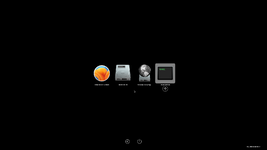
5. Repeat steps 3 and 4 as you need to boot twice for the full effect.
6. If you're using
CleanNvram.efi you need to boot from the CleanNvram option twice.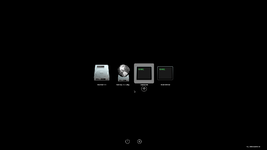
NOTE: This process will clear the NVRAM (native and emulated) variables stored. Once cleared, the system will automatically restart.
QUICK INFO:
When the HideAuxiliary option is Enabled, you need to press the Space Bar Key on your Keyboard to show all the other options in the picker.
Last edited:


