- Joined
- Mar 28, 2024
- Messages
- 6
- Motherboard
- DELL Optiplex 5055
- CPU
- Ryzen 5 2400G
- Graphics
- AMD Radeon Vega 11
- OS X/macOS
- 13.x
- Bootloader
- OpenCore (UEFI)
- Mac
- iMac
- Mobile Phone
- Android
Hello,
Well I hope I can get some help from some Mac Guru
The PC is SFF Dell Optiplex 5055 only the SSD (noname) is not from the original computer
In bios AMD-V is enable, Secureboot is Disable
I followed this guide on youtube to create a EFI.
I downloaded Sonoma Basesystem with this code
I used the dell specific option mentionned in the guide and the config.plist was validated by the application.
The only thing I was not sure is the Kext for Network, since the ethernet is BCM5762B0KMLG I used BCM5722D.kext
Note1: I also tested with the SecureBootMod on disabled on the config.plist
Note2: UpdateSMBIOSmo is set to Custom because otherwise OCAT gives an error since I am using Dell
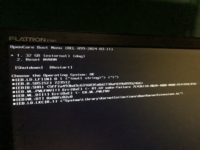
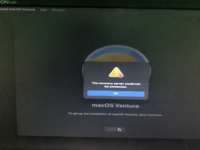
here is the error I get after I choose DMG to boot:

Well I hope I can get some help from some Mac Guru
The PC is SFF Dell Optiplex 5055 only the SSD (noname) is not from the original computer
In bios AMD-V is enable, Secureboot is Disable
I followed this guide on youtube to create a EFI.
I downloaded Sonoma Basesystem with this code
Code:
python3 macrecovery.py -b Mac-937A206F2EE63C01 -m 00000000000000000 downloadThe only thing I was not sure is the Kext for Network, since the ethernet is BCM5762B0KMLG I used BCM5722D.kext
Note1: I also tested with the SecureBootMod on disabled on the config.plist
Note2: UpdateSMBIOSmo is set to Custom because otherwise OCAT gives an error since I am using Dell
here is the error I get after I choose DMG to boot: