• Become a Premium Member for $25/year with no ads to improve your community experience. Upgrade to Pro Account for faster response and no wait times!

desktop intel hd4400 7mb

kk_kk29

New member
Joined
Oct 24, 2022
Messages
10
Motherboard
Asus-h81m-k
CPU
intel core i3-4130
Graphics
intel uhd graphics 4400
OS X/macOS
10.13.x
Bootloader
  1. OpenCore (UEFI)
Mobile Phone
  1. Android

Attachments

  • screenshot.png
    screenshot.png
    91.5 KB · Views: 4
Hello!
My intel HD4400 graphics card shows 5mb. I have already entered everything in the config.plist (device id, framebuffer..etc) but when I try to boot it gets stuck here; gIOScreenLockState3. What could be the problem?
efi file: https://drive.google.com/drive/folders/1ewmsvYZtQApItvpUKV7NbHuWrI4ivl9a?usp=sharing
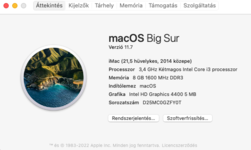
Your configuration is not as per the guide.

Start here:
 
And this EFI folder? ;
Here are a few issues.

Make the following changes to your config.plist

- Remove ResetLogoStatus Quirk in ACPI>Quirks section.
- Kexts loading order is not correct. Important Kexts should load first.
- Set KernelArch to Auto.
- Set Target to 3 in Misc>Debug section.
- Set Expose Sensitive Data to Misc>Security.
- Set the SMBIOS to iMac14,1 or 14,2.
- Drivers loading order is not correct. Important Drivers should load first.
- Remove HfsPlus.efi and use OpenHfsPlus.efi.

Once you're done with the changes, save your config.plist. Restart the system and reset NVRAM twice. Attach the new PR files.
 
The system does not boot with these settings. When I put in openhfsplus.efi, it says that the file hfsplus.efi is missing, and for 14,2 mac it says that this macOS version is not supported. What could be the problem?
 
The system does not boot with these settings.
Which settings?
When I put in openhfsplus.efi, it says that the file hfsplus.efi is missing
OpenHfsPlus.efi must exist in your Drivers folder. In addition, HfsPlus.efi must be removed from Misc>Drivers and from the Drivers directory.
14,2 mac it says that this macOS version is not supported. What could be the problem?
What macOS version are you trying to boot?
 
-Remove ResetLogoStatus Quirk in ACPI>Quirks section.
- Kexts loading order is not correct. Important Kexts should load first.
- Set KernelArch to Auto.
- Set Target to 3 in Misc>Debug section.
- Set Expose Sensitive Data to Misc>Security.
- Set the SMBIOS to iMac14,1 or 14,2.
- Drivers loading order is not correct. Important Drivers should load first.
- Remove HfsPlus.efi and use OpenHfsPlus.efi.
With this settings.
OpenHfsPlus.efi must exist in your Drivers folder. In addition, HfsPlus.efi must be removed from Misc>Drivers and from the Drivers directory.
The dortania guide says that hfsplus.efi must be in the drivers.

What macOS version are you trying to boot?
BigSur 11.7

But what could be the problem with the intel hd4400, because the system works perfectly with these settings except the graphics.
 
With this settings.
Settings are correct.
The dortania guide says that hfsplus.efi must be in the drivers.
HfsPlus is depreciated. OpenHfsPlus is the new driver. As stated before, OpenHfsPlus.efi must exist in your Drivers directory and must be linked in UEFI>Drivers section. Note that you should remove HfsPlus from Drivers directory and from the UEFI>Drivers section.
BigSur 11.7
You can use boot arg "-no-compat-check" to bypass the check or can use iMac15,x SMBIOS.
But what could be the problem with the intel hd4400, because the system works perfectly with these settings except the graphics.
What display connection are you using?
 
What display connection are you using?
VGA connection. I just don't understand what the problem could be with the hd4400, because the framebuffer, device-id, etc.. are activated (included in the config.plist file).
 
VGA connection. I just don't understand what the problem could be with the hd4400, because the framebuffer, device-id, etc.. are activated (included in the config.plist file).
That's the issue. Use HDMI/DP. The least is DVI
 

Forum statistics

Threads
2,148
Messages
19,849
Members
30,368
Latest member
izzykaif